Prospecting
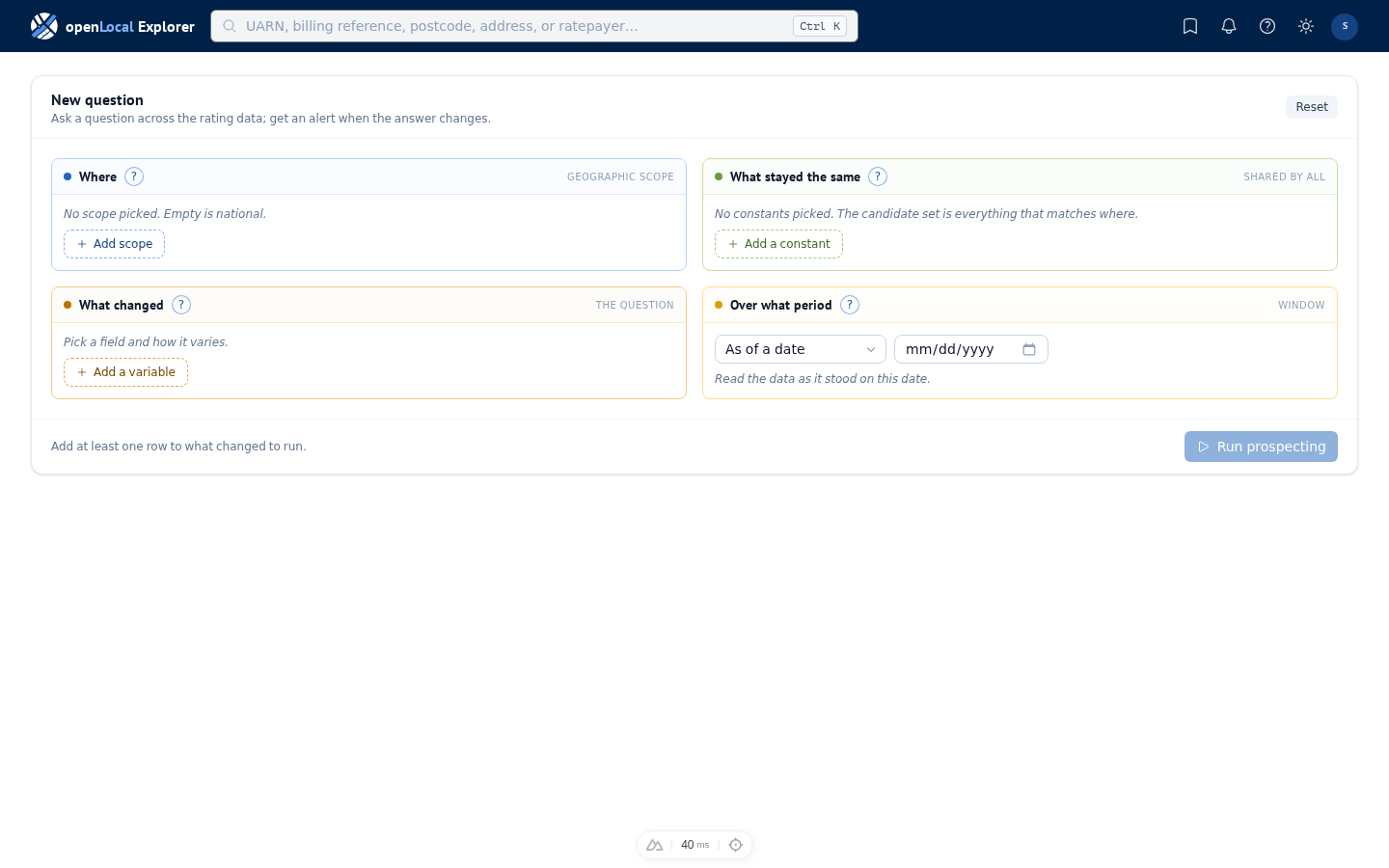
Prospecting is how you ask a question that watches the answer. You compose the question by filling four dimensions, save it with alerts, and allocate the hereditaments that matter to a portfolio. Where Search finds what's there now, Prospecting tells you when the answer changes.
What prospecting is
The wizard surfaces four dimensions: Where, What stayed the same, What changed, and Over what period. Fill them in any order; the Explorer composes the right kind of search from what you enter. A search holds only hereditaments on the rating list at the moment it reads: one the VOA has deleted, or whose only entry never took effect, is left out, and one entered since the list's last refresh is in. Press ⌘↵ (Mac) or Ctrl+Enter (Windows / Linux) to run the search when the question is well-formed.
First-touch walkthrough
First-time researchers see an optional walk-through that opens with a worked example — Camden shops whose rateable values stand out from the peer median on the 2023 rating list. Dismissable; bring it back from Settings → Reset help.
Where
The geographic scope. Empty Where means national. Pick at the level that matches your question — Region, Combined authority, or Billing authority.
What stayed the same
The fields shared by every hereditament in the set. Pin a category, a scheme, a ratepayer name, a floor area. This dimension also defines the peer set when What changed is a deviation: the median or mean is taken across the group you have pinned here. A condition on what else the ratepayer holds is an Other holdings row.
Other holdings
Other holdings asks about everything else the ratepayer holds. The ratepayer is the one each row shows, and their holdings are the hereditaments recorded against the same account name: exactly that name, so a chain under several spellings counts one spelling at a time. Every holdings condition reads the moment the question reads. Count now counts what the account held then, count ever what it had held up to then, and a question about a past date never counts a property the account took on later. Count now · is 0 finds a ratepayer whose only holding is this one. The counts and the total read in scope (inside your Where) or anywhere.
The other conditions (RV, occupied since, state) each ask about one field of the other holdings, for all others or any other: all others · RV · is below £50,000 finds a ratepayer whose other properties are all smaller than that. None of them asks whether the other holdings would match your whole question, so the one property in a chain that fits every row is found by asking the question and then reading the account's other holdings yourself.
What changed
The field whose change, deviation, absence, or threshold-crossing is the question. Each row carries the field, the variation pattern, the value, and (for a numeric pattern) the direction, all on one line. + Add field below the dimension creates another row.
Any relief asks about relief of any type: whether a hereditament (or every holding of an account) holds none now, or gained / lost relief between two dates — held none, then some, or the reverse. Relief type asks about specific reliefs: pick the types to watch — or leave the picker empty to watch every type — then whether a hereditament (or every holding of an account) lacks them now, lacks everything except them, gained / lost one between two dates, or had its basis change: from published by the council to determined by our rules, or between any two bases you name. Neither applies a rateable-value bracket; the small-business question is composed as Relief type is absent with rateable value held at most £15,000, and its frame grades the eligibility tier. One honesty note on gained and lost: charges carry no end date. Each charge is read at its own date — the award date where the authority gave one, otherwise the day it was published — across every record the account holds at that hereditament. A year of awards published in one file still arrives on one day, and an authority that stops publishing charge rows will read as widespread loss; treat a cluster of losses from one authority as a publication change first.
Changed more than its peers did answers the question surveyors ask most: "who got a larger increase than their peer group would predict?" Pick the field (rateable value, say), the two moments in Over what period, and how much beyond the group's own change a hereditament must move — in percentage points (their change plus 25 points) or as a multiple (1.25× their change; this reading needs a rising group). The peer group is exactly what you define: the authorities in Where and the constraints in What stayed the same. Hold "category is Office" and RV "stayed at or above £500,000", and the group's change is computed over precisely those offices — never a wider population trimmed afterwards. The multiple reading against a falling group returns nothing by design; switch to percentage points to ask about falls. Behind advanced… sit the statistic (the group's average change, or a chosen percentile of it) and the minimum group size a comparison needs.
Over what period
The window the question reads across. Five shapes: As of a date and Around a date read one moment; Between two dates, Between two lists, and One list, two dates read two. The picker offers only the shapes every row can run under — a two-moment pattern, a hold that reads one side of the window, or a hold that is unchanged across it all need a paired shape — and says which row narrowed the choice. Each hold in What stayed the same says which moment it reads: with none picked, on the date under one moment, both lists (or both dates) on a valuation field across two, and the occupier shown on a ratepayer field; pick either, later, or earlier to read one side. Between two dates you set, a hold can also read the whole span: at any point between keeps a property where some date in it meets the hold (ever vacant between April and March, valued at £12,000 or more at any point in 2024), and throughout where every date does (occupied throughout). On a ratepayer field a span reads the earlier date and every date a record we received carries up to the later one, so a council publishing quarterly cannot show what began and ended between two files. On a valuation field it reads the list as it stood at the earlier date and after each change the VOA published up to the later one; across a revaluation's 1 April it reads both lists, and on One list, two dates it starts no earlier than that list came into force. A peer comparison holding a valuation field over a span runs in the background, since it reads the list once for each update. Throughout is not is unchanged: a property occupied, then vacant, then occupied again is unchanged across the window but not occupied throughout (Throughout needs a record at the start). A question that reads one moment — a relief or account absence, or how far a value sits from its peers — says which moment too, in the same words: the later unless you pick earlier, either, or both. At either or both, a row shows the later moment wherever it matched there, except a peer comparison, which shows the moment the hereditament stood further from its peers. Each moment is measured against its own peers there, so that compares how unusual the property was at each moment, not its values. A row showing the earlier moment says so under its address (shown at 2017, or the date where both ends sit on one list); a download names every row's moment in a Shown at column. A window across two lists reads whole list states, each at its own date; the line under the picker says which lists it resolved to. A window inside one list starts no earlier than the day the list came into force, and the line says so when it moves your start. Each dated moment reads its list as it stood on its date, and a row the VOA has since changed carries the same note as in a dated search. When What changed compares each hereditament against its peers, the peers are read at this window too.
Picking a geography
Type to find a region, a combined authority, or a billing authority; picking a region or combined authority picks every billing authority beneath it. Each pick shows the day we last collected its files and how often it publishes. Collected since…, beside the saved lists, narrows the authorities on offer to those we collected from within the last three, six, or twelve months, or since a day you choose; you still pick from them, and a pick outside the span stays, greyed. Save a set of picks as a named list to reuse it; a saved list applies with one pick and can be deleted from the same control.
Data coverage
Each picked authority shows the day its newest list was collected and how often it publishes: "Camden 12 Sep 2026 · Quarterly since 2017". A thin-coverage authority returns fewer ratepayer matches.
Variation patterns
The pattern picker is grouped by how many moments the question reads. How it compares right now (one moment): sits far from its peers' typical value, its peers' average, or the extreme tail of its peers; for a relief, is absent, is absent except, or is absent account-wide. How it changed over the period (two moments): changed more than its peers did, rose or fell by an amount or by a percentage, crossed a boundary, changed, changed from one value to another, and for a relief was applied / became absent (a named type), was gained / was lost (any relief), or basis changed (how it came to be recorded). Relief amount takes the numeric patterns, read over the account's relief total at each moment. Pick the pattern first — its controls follow — and the period picker offers only the windows the pattern can run under. A one-moment pattern under a two-moment window says which moment it reads (Over what period). The register lists many hereditaments at £1, so a category full of them has a typical value of £1 and every real valuation in it reads as far out; to compare like with like, hold Rateable value above a floor in What stayed the same. The peers are read from what you hold, so the floor shapes the peer value as well as the rows.
Peer-group size
Behind advanced… on a peer-comparison pattern sits peer group ≥ N, resting at 5. A comparison against a handful of peers says little, so a group thinner than N is annotated in the results, never hidden. The peer set is exactly what Where and What stayed the same define.
Schemes are within a rating list
A scheme reference is per-revaluation — the 2023 list has its own schemes; the 2026 list has its own. When Over what period pairs two lists, the scheme in What stayed the same anchors the cohort on whichever list carries it, and the run says so if neither does. Across lists the only stable thread is the hereditament itself (its UARN); to keep like with like, hold Total floor area · is unchanged as well.
Charges have no expiry date
Charge records carry no end date, so a relief is read by its absence at a moment, never by its expiry: is absent, is absent except, and is absent account-wide read now; was applied / became absent (a named type), was gained / was lost (any relief), and basis changed read each charge at its own date — the award date where one was published, the day it arrived otherwise — across the account's records at that hereditament. A row's reliefs column reads differently, on purpose: it shows every relief awarded by the row's date and every relief with no award date, whenever it arrived. So a row can show a relief the question did not count, typically a new occupier's award that first appeared in a file published after your window; add Source published from the lens to see when the record arrived.
The three "absent" readings differ in what they let through. Is absent keeps ratepayers holding none of the types you name — they may hold others. Is absent except keeps those holding one of the types you name and nothing else, which is the question which of my retail-relief recipients claim nothing further? For ratepayers holding no relief at all, ask Any relief · is absent. An authority that stops publishing charge rows reads as widespread loss; treat a cluster of losses from one authority as a publication change first.
Throughout needs a record at the start
Why didn't I get any results? Because no record meets the earlier date. Throughout asks the hold of every date in the span, the earlier date included, so a property we hold nothing for at that date is left out, however its later records read: a business that moved in after the span began was not occupied throughout it, and a property added to the list after it began was not valued at anything throughout it. The same question at both dates can return more, because it reads only the two ends.
To find those properties, move the earlier date to after their first record, or ask at any point between instead. The submit card's Query defaults line says so whenever a hold reads throughout.
What counts as a relief
Authorities publish relief rows differently. Some record an award with no figure at all; some publish a zero against a relief they did apply; and a few publish zeros that look like a column that arrived wrong. Nothing in a row tells them apart, so the relief row carries the reading as part of your question:
- Any recorded — every published row counts, whatever its amount.
- Unless zero — a row counts unless its amount is exactly zero. The row rests here.
- Only above zero — a row counts only where an amount above zero was published.
The choice can move an answer by thousands of rows, so the reading in force is stated when you submit and read back on the answer. Where an authority's results look wrong, change the reading and compare — publishers differ from one another, so reviewing one authority at a time is the quickest way to see which reading fits.
The choice governs every relief your question names. Ask for an absence of Small Business Relief, or of relief of any kind, and your reading of a zero decides the answer throughout. An except question is the one exception: is absent except retail names retail, and the rest of the published reliefs are what you did not describe, so any of those the authority recorded rules a property out whatever its amount — otherwise a relief too small to count as held would also be too small to exclude, and a property carrying a zero Small Business Relief would come back as free of it. The submit card says so when the two readings differ.
A relief is read across the occupier's records, not one of them. An authority publishes the same account many times, and an award recorded on one publication is one the account holds; where it leaves the name out, a shared start date says the records are one account, unless the authority gives that date to a large share of its accounts at once. The question still answers about the occupier in force at the date you asked about — a previous occupier's relief is theirs, not this one's, so a property whose page shows a relief in its history can still be absent of it today.
When an answer is larger than the window
The table shows the first 500 rows. Where more match, it reads first 500 — more match and offers Fetch all, which runs the whole question in the background and lands the full result in your inbox.
Every condition in your question is applied before that cut, so the rows you see are the first 500 of the whole answer, in the answer's own order — not a sample of it. A download runs the whole answer rather than the window.
Cross-list invariance
Comparing across two rating lists is honest only while the hereditament is still the same thing. Hold Total floor area · both lists · is unchanged in What stayed the same, with a tolerance in square metres if you want one, to keep like with like; the same operator holds any valuation-side field, or the occupier, steady across the window. Without it, every hereditament valued on both lists counts — extensions, splits, and mergers included — and a change in value may be a change in the building. The submit card's Query defaults line says which reading applies.
First-time loads
A first run over an area nobody has asked about recently reads from cold storage and takes longer; asked again, the same question is much quicker. National questions run in the background whatever their state.
Adjusting from the question row
The results table's Question row shows four colour-coded chips — one per dimension. Click a chip to edit one pick inline; the query re-runs and the table reloads in place. For a larger rebuild, click Edit composition to return to the wizard with the current state seeded.
Saving with alerts
Save (⌘S / Ctrl+S) names the question, and can turn on its alert in the same dialog. Once saved, the toolbar button becomes a bell, which reopens the dialog: Update saves your edits over the bookmark and its alert together, and Save as new keeps them as a second bookmark under its own name. To start a variant from what you saved, use the copy button on its row under Saved: the copy holds the question alone, with no alert, named (copy) until you rename it. Re-opening a saved question runs it against current data. For what an alert does, see Alerts.
Query defaults
The submit card's last line names the readings the question applies that you did not set — which charges count as reliefs (published or rule-confirmed; surcharges never), how the occupier at a date is chosen (by the account's own start date), which occupation states are included, what a peer group is, whether a one-moment question in a paired window reads the later moment, and the result cap. A default drops from the line when a row of yours overrides it, so what you see before you run is what runs.
Allocate to a portfolio
Tick the rows you want and click Allocate selected in the results-table toolbar. The side panel opens with a source summary and a target picker — an existing portfolio or a new one. The action label carries the named target — for example "Allocate 2 to Camden retail watch".
Prospecting versus portfolio
A saved question is re-run, and its alert tells you when its answer changes. A portfolio is a fixed list of hereditaments you chose, and can carry an alert of its own on what happens to them. Adding a question's results to a portfolio leaves the question as it was; the two are independent.